- Click here to see all your CityVille feeds.
- Now you can bookmark that page so that you can find it again. Here are step by step instructions for Chrome, Firefox 7, and IE 9.
- Chrome
- Click on the star all the way to the right on your address bar.

- Choose a name for your bookmark and where to place it (Bookmarks bar is a great choice and will make it easy to find when you need it). Then just click on "Done".

- Click on the star all the way to the right on your address bar.
- Firefox 7
- Click on the star all the way across from your address bar.

- Click on that star again to chose the name and location for your bookmark.

- Name your new bookmark and select where to place it (Bookmarks tool bar is a great choice and will make it easy to find when you need it). Then just click on "Done".
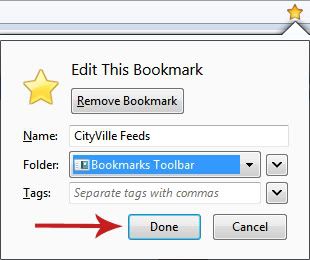
- Click on the star all the way across from your address bar.
- Internet Explorer 9
- Click on the start right below the X of your browser, all the way to the right.
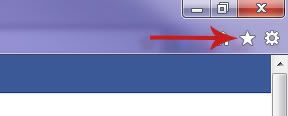
- Click on "Add to Favorites" to select a name and location for your new bookmark.

- Name your bookmark and select where to place it (Favorites bar is a great choice and will make it easy to find when you need it). Then just click on "Add".

- Click on the start right below the X of your browser, all the way to the right.
- Chrome
No comments:
Post a Comment