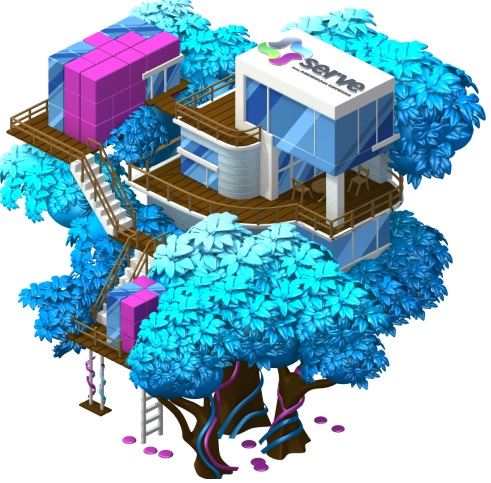
Here is some information to help answer most of your questions related to the Serve Money Tree on your City.
Visit http://www.serve.com/zynga/ to learn more.
- What is the Serve Money Treehouse and where can I find it in CityVille?
- The Serve Money Treehouse is a luxurious, rewarding treehouse from Zynga Serve Rewards that you can place in your City to start earning City Cash. Find it in the Market Place by typing “Serve Money Treehouse” into the search toolbar. The Serve Money Treehouse will appear when you reach Level 7 in Cityville.
The Treehouse will be available to all eligible U.S. CityVille players through April 15, 2013.
- How many City Cash can I earn with my Serve Money Treehouse?
- You can earn up to 1,330 City Cash with Zynga Serve Rewards in CityVille through April 15, 2013 when you complete the below steps:
1) Place the Serve Money Treehouse and harvest for 1 City Cash every 24 hours –– 5 City Cash2) Sign up for Zynga Serve Rewards in CityVille –– 100 City Cash
3) Add money to your Zynga Serve Rewards Account for the 1st time –– 200 City Cash
4) Activate your Zynga Serve Rewards Prepaid Card –– 30 City Cash
5) Make purchases using your Zynga Serve Rewards Card –– 100 City Cash each, up to 10 timesPlease note: you can only earn rewards in one game at this time.In most cases, you will receive your City Cash instantly. However, please allow up to 6 days for City Cash to appear in your game account once you sign up for Zynga Serve Rewards, up to 14 days after you activate your Card or add money to your Account for the first time, and up to 30 days after each qualifying purchase. Although it may take up to 30 days to receive Crowns after a purchase, in the meantime, you can complete additional purchases to earn your remaining Crowns!
Before you sign up for Zynga Serve Rewards, you can also earn 2 City Cash by watching a quick video to learn more about the benefits of Serve. The video can be found in the Rewards Progression Dialogue you see when you interact with the Serve Money Treehouse in your City.
It gets even better. Additionally, when you complete each of the steps above, your Serve Money Treehouse will dispense coins and your population cap will increase!
- I signed up for Zynga Serve Rewards in CityVille. Can I earn rewards in the other Zynga games I play?
- For now, it is not possible to switch the game that you earn in. Your rewards are sent to the game in which you signed up for Zynga Serve Rewards. For instance, if you signed up for Zynga Serve Rewards in CityVille, you will only earn in CityVille. But hang in there! We are working to give you the option of switching the game you earn in.
- What are the four different Treehouses I see when I harvest my Serve Money Treehouse?
- You will earn City Cash and get a new, more luxurious treehouse with each step you complete with Serve.
• Small Treehouse: Place the Serve Money Treehouse and earn up to 5 City Cash when you harvest it.
• Medium-size Treehouse: Get 100 City Cash when you sign up for Zynga Serve Rewards and watch your Treehouse expand in size.
• Large Treehouse: Activate your new Card and you can get 30 City Cash and watch your Treehouse grow even more rooms and features.
• Full-size Treehouse: Earn 100 City Cash on each of your first 10 purchases using your Card online or offline through April 15, 2013 and watch your Treehouse grow to its maximum size.
- I signed up for Zynga Serve Rewards in CityVille. Can I earn additional rewards by also signing up for Zynga Serve Rewards in other Zynga games, including FarmVille or Zynga Poker?
- For now, you can only earn Zynga Serve Rewards in a single game. But stay tuned, because we are working to make it possible for you to switch the game you earn in.
- Why should I sign up for Zynga Serve Rewards?
- Serve® from American Express is offering the only Reloadable Prepaid Card that can help you grow your Zynga virtual world. Plus, it comes with the safety and security you expect from American Express. You can use your Card virtually anywhere American Express® Cards are accepted worldwide.
Zynga Serve Rewards Cards have no credit checks, no monthly or annual fees, and it’s free to sign up. Visit serve.com/zynga for more info.
- How do I qualify for a Zynga Serve Rewards card in CityVille?
- To get a Zynga Serve Rewards Card, you need to be a CityVille player so you can earn City Cash. You also must meet certain Serve Account requirements. Accounts are available to U.S. residents over 18 years old (19 and over in Alabama and Nebraska) who successfully complete our sign-up process and security check.The Zynga Serve Rewards Card is an extension of the Serve Reloadable Prepaid Account. Serve has no credit checks, no monthly or annual fees, and no long-term commitments.
- How do I get 100 City Cash when I sign up for Zynga Serve Rewards in CityVille?
- You can sign up for Zynga Serve Rewards through the in-game offer found in CityVille. Click the “Free Sign Up” button in the Rewards Progression Dialogue you see when you interact with the Serve Money Treehouse in your City.
Once you click the button, you will be taken to a webpage that will give you more information about the Zynga Serve Rewards. Click "Sign Up" and complete the two-step registration process and verify your email address. And the next time you visit your City, your game account should increase by 100 City Cash! Please note that in some cases, it can take up to 6 days for City Cash to appear in your game account.
- How do I earn City Cash for signing up? Can I just sign up through serve.com?
- To receive City Cash, you must sign up for Zynga Serve Rewards from your CityVille game. Go to your CityVille game in Facebook, click on the Market Place, and type “Serve Money Treehouse” in the search toolbar. Place the Serve Money Treehouse and look for the option to sign up for Serve. Then follow the prompts. If you try to paste the URL into the browser or sign up from serve.com, you are simply signing up for a Serve Account and will not be eligible to earn City Cash.
- I am a current Serve Account holder. Can I convert my Account to Zynga Serve Rewards?
- If you are a current Serve Account holder, you can convert your Serve Account to Zynga Serve Rewards in FarmVille. For now it is not possible to convert your existing Serve Account to Zynga Serve Rewards in any other game.
- Help! I forgot my password.
- There are two ways to reset your password.
1) Click on the “Reset my Password” link and you’ll be sent an email on how to reset your password.
2) Call Customer Service at 1-800-954-0559, 24 hours a day, and seven days a week.
- I signed up for a Zynga Serve Rewards Card in CityVille, but I haven't received my email verification code. What do I do?
- The email verification code should arrive in your email inbox within 30 minutes of registration. If it has not arrived, the first step is to check your spam folder or junk mail. If you still have not received the verification, you can log into your Serve Account and request a new email verification code by clicking on “Request a New Code” on your Serve Account dashboard. Still having trouble? Call Serve Customer Service at 1-800-954-0559.
You must verify your email address to earn City Cash!
- I signed up and I don’t see my City Cash. Why?
- You must verify your email address to earn City Cash. We sent you a verification email after you registered. Just click on the link in that email. If you need a new verification email you can request one from your Account online. Sign in and look on your dashboard for the option to resend a verification email. Please keep in mind that it can take up to 6 days to get your City Cash after you sign up for Zynga Serve Rewards. It can take up to 14 days to get your City Cash after you activate your Card.Still having trouble? Call Serve Customer Service at 1-800-954-0559.
- I signed up for Zynga Serve Rewards in CityVille and want to earn 30 City Cash when I activate my Card. When will I get my new Card in the mail so I can activate it?
- You should receive your Zynga Serve Rewards Card within 7-10 business days after you register in CityVille, although we’ll try our very best to get it to you sooner!
- How do I activate my Zynga Serve Rewards Card and earn 30 City Cash?
- Have your Card in hand and visit serve.com/activate or call 1-800-597-0184. Follow the prompts to activate your Card and the next time you visit your City, your game account should increase by 30 City Cash! Note that in some cases, City Cash can take up to 14 days after your activate your Card to appear in your game account.
- How do I add money to my new Account and earn 200 City Cash?
- You are eligible to earn 200 City Cash when you add money to your Zynga Serve Rewards Account for the first time. You can add money to your Zynga Serve Rewards Account using a bank account, debit card, credit card, or cash with a MoneyPak®. (Cash advance fees may apply for credit card loads; please check with your credit card issuer for details. MoneyPak purchase fees of up to $4.95 may apply.)
Go to serve.com to sign into your Serve Account and click on the Add Money tab. Serve does not currently charge fees for adding money; please see theSchedule of Fees in the Serve Consumer User Agreement for details.
If you add funds from your bank account, please allow up to 7 days for the funds to transfer to your Serve account.
After the funds transfer is complete, your game account will be credited with 200 City Cash! It can take up to 14 days after your funds transfer is complete for the City Cash to appear in your game account, though in most cases you should get it sooner!
- I received my Zynga Serve Rewards Card for CityVille in the mail and activated it. What’s the next step?
- If you haven’t already, add money to your Serve Account using a bank account, debit card, credit card, or cash with a MoneyPak® (cash advance fees may apply for credit card loads; please check with your credit card issuer for details. MoneyPak purchase fees of up to $4.95 may apply). Then, take it out shopping and use it virtually anywhere American Express® Cards are accepted worldwide. Earn 100 City Cash on each of your first 10 purchases using your Card online or offline through April 15, 2013 –– that’s up to 1,000 City Cash!
- Can I make a purchase with my Zynga Serve Rewards Card if I don't have enough available funds in my Account to complete my purchase?
- If you have a credit card or debit card linked to your Serve Account, the card you have set as your backup funding source will be used for the remaining balance of your purchase. If you do not have a backup funding source, you will have to add money to your Serve Account before you can make your purchase. Please note that cash advance fees may apply for credit card loads; please check with your credit card issuer for details.
- How do I know when my Serve Money Treehouse is ready to be harvested?
- The Serve Money Treehouse will glow and shimmer in your City when it is available to harvest.
If you’re unsure, just click on the Treehouse and it will tell you if it’s ready to harvest.
- Does the City Cash expire? Can I lose the opportunity to earn City Cash if I don’t harvest my Treehouse in time?
- Good news! Your City Cash doesn’t expire. Once you place the tree, you will have the opportunity to harvest for 1 City Cash every 24 hours, up to 5 times. Even if you wait more than 24 hours between harvesting, you are still eligible to harvest 5 times! Additionally you have the opportunity to earn:
• 100 City Cash when you sign up for Zynga Serve Rewards in CityVille. Note that it can take up to 6 days after signing up for City Cash to appear in your game account.
• 30 City Cash when you activate your Card. Note that it can take up to 14 days after card activation for City Cash to appear in your game account.
• 200 City Cash when you add money to your Serve Account for the first time. Note that it can take up to 14 days after the transfer is complete for City Cash to appear in your game account.
• 100 City Cash on each of your first 10 purchases using your Card online or offline. Note that it can take up to 30 days after each qualifying purchase for City Cash to appear in your game account.
- How long do I have to complete the Serve Money Treehouse activities to earn City Cash?
- To earn up to 1,330 City Cash, you must sign up, add money, activate your new Prepaid Card, and use your Card for purchases online or offline (up to 10 times) by April 15, 2013. So don’t hesitate –– get started!
- I sold my Treehouse. How do I get it back?
- You can go into the Market Place, search “Serve Money Treehouse,” and place the Treehouse again. You’ll pick up right where you left off!
- I put my Treehouse into my inventory. How do I get it back?
- Visit your inventory through your game and place the Treehouse again. You’ll pick up right where you left off!
- I am a subaccount holder. Can I earn City Cash?
- Unfortunately at this time, as a subaccount holder, you are not eligible to earn City Cash for activating your Card, adding money to your Account, or making qualifying purchase using your Card. Stay updated on future opportunities by visiting serve.com/zynga.
- I am the main Serve Account holder and have 1 – 3 subaccounts. Can I earn City Cash through my subaccounts?
- Unfortunately activities completed by subaccount holder(s) — Card activation, add money transactions, or purchase transactions — will not earn City Cash.
- What else can I do with my Zynga Serve Rewards Account in CityVille?
- The Zynga Serve Rewards card is an extension of the Serve Reloadable Prepaid Account. Serve has no credit checks, no monthly or annual fees, and no long-term commitments. With Serve you can send and receive money by email, text, and Facebook and access your Account with the mobile app.
- Are there fees to use my Zynga Serve Rewards Card?
- You will not be charged fees for using the Zynga Serve Rewards Card or linking a bank account, credit card, or debit card. Serve also does not charge a fee for your first ATM withdrawal each month; after that it is $2 per withdrawal. Please note that your credit card company may charge you a cash advance fee for loading money from your credit card. Please check with your credit card issuer for details. ATM owners may charge their own fees for each ATM withdrawal.
After March 15, 2013 there will be fees for adding money from a debit or credit card. You can see the fees in Section 10 of the Serve Consumer User Agreement: Schedule of Services and Charges.
- What can I do with my Zynga Serve Rewards Card?
- The Zynga Serve Rewards Card is a Reloadable Prepaid Card that can be used for everyday purchases virtually anywhere American Express® Cards are accepted worldwide. What makes it better is that you’ll also earn City Cash when you make qualifying purchases.
- I don’t live in the U.S.; can I still get the Serve Money Treehouse for my City or sign up to earn Zynga Serve Rewards?
- We’re sorry, but the Serve Money Treehouse and Zynga Serve Rewards are only available to U.S. players at this time.
- Where can I get more information about Zynga Serve Rewards?
- Visit serve.com/zynga to learn more.
- Who can I contact if I need more help?
- You can always call Customer Service at 1-800-954-0559, 24 hours a day, seven days a week.
Who can I contact if I need more help?
You can always call customer service at 1-800-954-0559 24-hours a day, seven days a week.


No comments:
Post a Comment