Showing posts with label Empires & Allies. Show all posts

Monday, May 23, 2016

On This Day - May, 23rd,2013. (E&A closure and bonus package in MW)

On this day (May, 23rd, 2016.) I've got 100 Reward Points in bonus package in Mafia Wars as reward for playing Empires &Allies, that was about to close in June,17,2013. That was a great reward. I do not know what is bonus package today in Texas Holdem Poker or Empires &Allies, because I am not playing E&A on mobile and Zynga Poker(?) (I dont think so, esp with that new look of Poker). So, at this moment I will not choose neither one of two offered games. 
There is a small difference between those two closures. When E&A was announced to be closed there stands that E&A will be shutting down on Facebook on June, 17th, 2013. When Mafia Wars was announced to be closed stands only that it will be closed on June, 6th, this year
So, I am pretty sure that this game is going to be closed as announced and without any chance to play it on mobiles, Amazon or anywhere else. 

On May, 23rd, 2013 - We've posted 

100 Reward Points in Bonus Package!


100 Reward Points - wooohoooo!!!!

As a player of Empires & Allies, game that will be shutting down on June, 17th, 2013. I was able to choose 1 between 4 offered games, to receive Bonus Package for.

I choose Mafia Wars.
I love this 100 Reward Points, thank you Zynga.

Post for this 
LINK


SADLY MAFIA WARS CLOSURE LOOKS VERY DIFFERENT


Thursday, October 29, 2015

Empires & Allies - Commanders, Prepare for the War Factory!


Logo
WarFactory_dark
Attention Commanders, be aware that there is a new update headed to the battlefield. Beginning today, Empires & Allies players will have clearance to access the War Factory, bringing never-before-seen levels of defensive and offensive strategy to their base.
We have heard from many of our Commanders that they want more ways to arm their base to make it stronger against enemy attacks. With the new War Factory crafting mechanic, players can enhance their preferred method of game play, whether it’s stocking up on new defensive weapons to better protect their base or earning power-ups to bolster their offensive strategy when launching attacks around the globe.
Check out the game today on the App Store and Google Play to access the War Factory and its explosive features including:
  • Stealth Generator: With the Stealth Generator, Commanders can cloak areas of their base, making them virtually invisible to attackers.
  • Air-Med Dronehive: The Air-Med Dronehive heals your base in real-time to improve your chances of surviving an incoming enemy attack.
  • Weapons Command Power-Up: For players who are offensively-minded, earning Weapons Command Power-Ups will boost their offensive power giving them strategic advantages when attacking, such as the ability to drop a nuke first on their opponent. Using Command Power-Ups is especially helpful in taking on bases that have deployed the defensive tools of the War Factory.
In addition to the War Factory, players will have access to two new and exciting features in the latest update. Since launching Empires & Allies, one of the top requests from our players is the ability to change their name. Starting today, players in Empires & Allies can now swap out their original name for a new in-game name. Also included in the update is an enhanced League Leaderboard which supplies all League players with the same number of medals, enabling them to climb the Leaderboard as they engage in fast, furious and fair battles.
Stay tuned for more news on Empires & Allies by following the game’s YouTubeTwitter,Tumblr and Facebook channels. Also tune in to the dev team’s weekly live stream “Firepower Fridays” at Twitch.tv/empiresandallies.
See you on the battlefield!
Stealth generator
Dronehive

Friday, October 2, 2015

Attention Commander: Alliance War Has Arrived!

Alliance war
Commanders, prepare your battlefield and get ready to wage war with a host of exciting updates now available in Empires & Allies! Check out the game today on the App Store andGoogle Play to gain access to explosive new features including:
  • Alliance War: Alliance War, the #1 most requested feature from you, our Commanders, is here! Starting today, teleport to a separate globe and fight with up to 100 players for total control in a robust player-versus-player format. During preparation for battle, players can reinforce fellow Alliance members and strengthen their own bases with strike force. Once your Alliance is victorious, share the spoils of war with your Alliance members and continue global domination!
  • Alliance Management and Troop Sharing: Better and more strategically manage your Alliance to exert more control over who joins your Alliance and the role they play in advancing the Alliance around the globe. Alliance leaders now have the ability to promote lieutenants and colonels, send Alliance announcements and supply Alliance members with key resources including tarmacs and rally flags. With the Troop Sharing feature, members of an Alliance can now gift one another troop resources for strategic advantage on the battlefield.
  • Surplus Cache: For Commanders who are HQ level 4 and above, new Surplus Cache crates will be unlocked to reveal boosts, medals, skins and more.
Stay updated on the latest news on Empires & Allies by following the game’s YouTubeTwitterTumblr and Facebook channels. Also, tune in to the dev team’s weekly live stream “Firepower Fridays” at Twitch.tv/empiresandallies this Friday, October 2 at 3:00 p.m. PT for a deep dive on mastering Alliance Wars.
See you on the battlefield!

Friday, July 31, 2015

Empires & Allies - Update 7/31- Leagues, New Leaderboards and more!

Atten-hut! 


Commanders, please note the new update now available in Empires & Allies! Check out the game today on the App Store and Google Play to gain access to some explosive new features, including: 


• Wage War in New Leagues: Compete for the rank of supreme commander in Empires & Allies' new League system, where players with the highest medal count in player-versus-player mode have a chance to win special in-game rewards, including exclusive flags and more. With limited-time events starting every week, and six tiers of multiple ranks, battles in each League are fast, furious and fair.

• Conquer Missions with New Terrains: More challenges await in player-versus-environment missions with new terrains, including lakes, ponds and roads that provide fresh, dynamic battlefields for commanders to overcome. 

• Deploying New Leaderboards & Alliance Recommendations: We're also adding more ways for players to see how they stack up against others with new friend-only, country-specific and league leaderboards. And with new alliance recommendations, players can now get intel on alliances to join based on a group's play style and activity level. 

• Base Upgrades and Overall Improvements: Walls can now be bulk upgraded for faster defensive maneuvers, and new memorials, only for the best of the best, are now available in Store Operations. The dev team has also been hard at work making several framerate and battery life improvements. Stay tuned for more news on Empires & Allies by following the game's Twitter, Tumblr or Facebook channels. Also tune in to the dev team's weekly live stream "Firepower Fridays" at Twitch.tv/empiresandallies  

• We fixed the following :
Players who are stuck in having their games prompt them to update
Players who can't switch their accounts

FAQ: 

> Q: I've updated and why can't I see leagues in my game?


A:  Should be now available to everyone!
> Q: Why am I only getting 1 or 24 medals for quick match

A: We're looking into this now, this may only be a temporary problem. No, this is NOT intended for you to consistently run into 1/24 medal awards. We're getting this sorted now! Thank you all for your quick feedback, was VERY helpful! 


If you have feedback or questions about the newest update, please post here

Thanks! 

Empires & Allies Player Support

Thursday, July 30, 2015

Commander, Be Advised: Leagues and New Battle Environments Now Available in Empires & Allies!

Empires & Allies  Key Art
Atten-hut! Commanders, be aware of a new update now available in Empires & Allies! Check out the game today on the App Store and Google Play to gain access to some explosive new features, including:
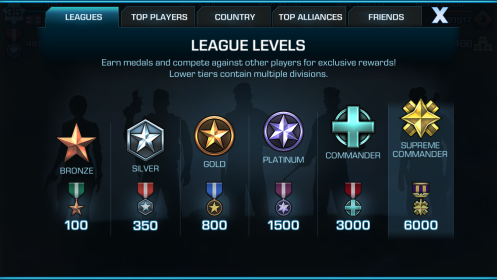
  • Wage War in New Leagues: Compete for the rank of supreme commander in Empires & Allies’ new League system, where players with the highest medal count in player-versus-player mode have a chance to win special in-game rewards, including exclusive flags and more. With limited-time events starting every week, and six tiers of multiple ranks, battles in each League are fast, furious and fair.
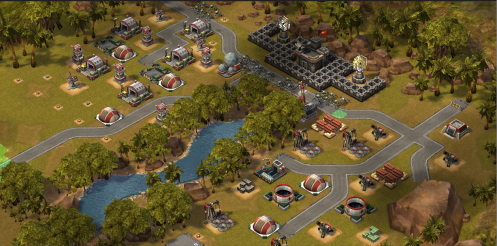
  • Conquer Missions with New Terrains: More challenges await in player-versus-environment missions with new terrains, including lakes, ponds and roads that provide fresh, dynamic battlefields for commanders to overcome.
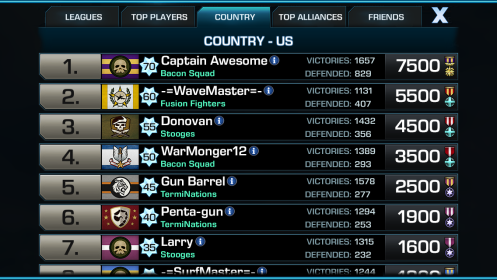
  • Deploying New Leaderboards & Alliance Recommendations: We’re also adding more ways for players to see how they stack up against others with new friend-only, country-specific and league leaderboards. And with new alliance recommendations, players can now get intel on alliances to join based on a group’s play style and activity level.
  • Base Upgrades and Overall Improvements: Walls can now be bulk upgraded for faster defensive maneuvers, and new memorials, only for the best of the best, are now available in Store Operations. The dev team has also been hard at work making several framerate and battery life improvements.
Stay tuned for more news on Empires & Allies by following the game’s YouTubeTwitter,Tumblr and Facebook channels. Also tune in to the dev team’s weekly live stream “Firepower Fridays” at Twitch.tv/empiresandallies
Empires & Allies Main Leagues Screen
Empires & Allies New Lake Terrain
Empires & Allies Country Leaderboard

Monday, June 15, 2015

Fire in the Hole! Leagues and New Battle Environments Coming Soon to Empires & Allies

Winter_Battle_01
Atten-hut! Commanders, be aware of the following new features coming soon to Empires & Allies! The dev team has been hard at work on new updates, and we’re proud to share a glimpse of what’s in store. Keep the engines running on your Apaches and A-10s, because the following features are launching in the coming weeks:
  • Get Ready for Leagues! Players will soon get a chance to compete for the rank of supreme commander. With our new Leagues system, players with the highest medal count in player-versus-player mode will have a chance to win special in-game rewards, including exclusive flags and more. With new League seasons starting every week, and six tiers of multiple ranks, battles in each League will be fast, furious and fair.
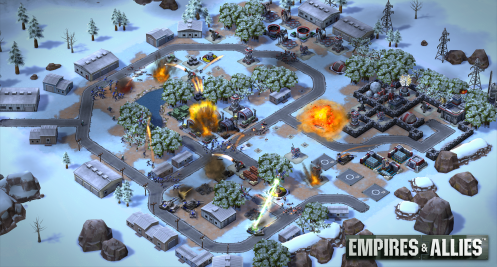
  • Explore New Terrains and Battlefields: Take a look above at one of the awesome new battlefields from our environmental artists. Artic terrains, along with lakes, ponds and roads will provide new challenges and dynamic battlefields for commanders to overcome. Each terrain will be added throughout the globe in player-versus-environment mode and its location matched to its real-world coordinates on the map.
  • More Events Inbound: We just wrapped up our first in-game event, challenging players to upgrade their HQ for a chance to earn gold and constructions boosts. More events are on the way in the coming weeks, so stay tuned to our TwitterTumblror Facebook channels for the next one. Our favorite event participants will also be featured on our weekly live stream “Firepower Fridays” at tv/empiresandallies
Empires & Allies continues to build an army of players since its global launch last month, and we thank all commanders for their loyal service and feedback to help make Empires & Alliesthe best modern military strategy game on mobile today. By the numbers, since launch players have waged a whopping 160 million battles and liberated  71 million countries. Keep taking the fight to the GRA, and download Empires & Allies today on the App Store and Google Play.
Check out the explosive Empires & Allies trailer for more.

Saturday, June 6, 2015

FAQ: Switch Account button - Empires & Allies

Greetings Commander,

Here's how the "switch" button works:

If you need to recover an account you were previously playing, you will go to Settings>Switch (under Accounts), after tapping switch, you will be shown all accounts that are connected to the social network you are currently connected to. 

1. Tap the Settings icon.


2. Tap the Switch button.


3. Connected accounts will be displayed. 

If you're moving from one device to another, you need to be sure you've logged in and connected the same accounts as on the previous device. These are currently Facebook, Game Center (iOS) and Google Play (Android). If you're trying to recover an old base and it's not coming up, that means you're not connected to the same account as the previous base was saved.


This is how your Game Settings should look like if you are connected to your Social Network accounts (iOS on the left, Google on the right; Both images shown are Facebook connected).

Keep in mind, if you had a "General#XXXXXX" name, this means you never connected to a social network and your game is not sync'd to the server and able to be recovered. In this case we recommend going back to the device you were playing (if this is possible) and connect the game to one of the accounts mentioned above to sync with the server and allow it to be recovered on another device. If you did not sync the account and are unable to access the original device, we regret to inform you we will not be able to recover this account for you.

We're looking into making this a smoother experience and I apologize if this affected you and you're unable to recover your progress. If there were any purchases on the previous account, we will be able to transfer those to your new account, but you'll need to provide all receipt information and we will need to verify with our billing team.

Few tips:
-Be sure you've connected your account as soon as possible.You can use Facebook or Gamecenter for iOS/Google Play for Android. If you're moving from iOS to Android (or vice versa) - You need to connect to Facebook to transfer your game. 
-We do not recommend multiple accounts and using multiple account in a manner that will give you an advantage over other players will result in action taken against your account.

Thanks,

Empires & Allies Player Support

Wednesday, May 13, 2015

Empires & Allies - Game Crashing when launching game?

Greetings Commander,

We've identified some issues with players installing the game to some of the bigger & third party SD cards available on the market. We've found a helpful work around for this problem though:

  • Delete the app from your phone
  • Unmount your SD Card on your Android Device (do not need to remove, just unmount)
  • After it’s confirmed the SD card isn't mounted, install the game from the Play store (to the device)
  • Verify the game launches, if so, Mount the SD card again

Now that you have your devices ready, go back to your HQ and protect it!  

Good luck! 

Empires & Allies Player Support 

Monday, May 11, 2015

Empires & Allies - Known Issues: 5/9

Greetings Commander, 


Known issues: 
Since launch we're actively monitoring your feedback and support inquiries for any emerging issues you may be experiencing, here's a look at a few issues we're tracking: 


Name changes
In order for you to pick a name, you will need to complete the tutorial and connect your game to Facebook or GameCenter (iOS)/Google Play (Android). At this time we do not have an option to change your name in game. We're working on a solution in the future! 


Task bar present in game  
Some Android devices are reporting a task bar present during gameplay which interrupts the ability to interact with all of the Empires & Allies game screen. We are looking into this now, we request any affected players try deleting and reinstalling from the Google Play store, if the issue persists let us know your device, model number, OS version for our investigation. 


Gold purchases  
We have been receiving very few reports of players unable to purchase gold. If you have any problem purchasing gold, please verify you have the most up-to-date version of the game (delete/reinstall) and if the issue persists, contact support from within the game. We'd like to know your device type/model, OS version and any details you can provide about the steps you took to get an error! 


Update Loop
The loop is: 
1) You launch an older version 
2) You are informed you must update and you click the link that takes you to the Android Play Store 
3) You cannot download a new version, because you do not see the new version (you're stuck) 


To resolve this, please follow these steps from Google: 
From Google: https://support.google.com/googleplay/troubleshooter/4592924?hl=en 
Especially take note of this step: https://support.google.com/googlepla...=en#ts=4592730 


Please share your thoughts by posting to the forums because we are listening for that detailed feedback! 


Thanks, 

Empires & Allies Player Support 

Tuesday, May 5, 2015

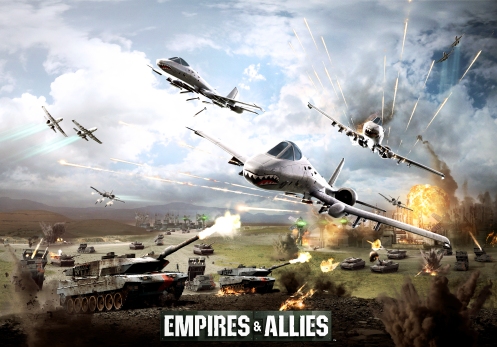
Forward…March! Empires & Allies Deploys Worldwide on the App Store and Google Play


Commander, your battlefield awaits! Today, Zynga is proud to announce the global launch of Empires & Allies, now available as a free download on the App Store for iPhone, iPad and iPod Touch and on Google Play.
Developed by a seasoned team of developers, and led by real-time strategy (RTS) and social games pioneer Mark Skaggs, Empires & Allies delivers the fun, action and excitement from traditional RTS games in an experience hand-crafted for mobile and tablet devices.
You want action? Check. Hollywood-style explosions? Check. 3D graphics? Yep, we’ve got that too.
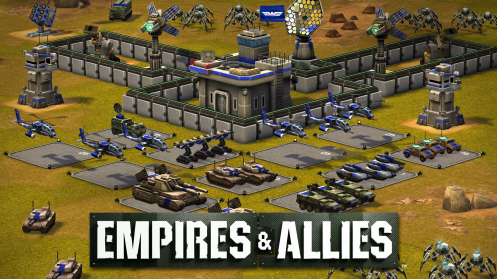
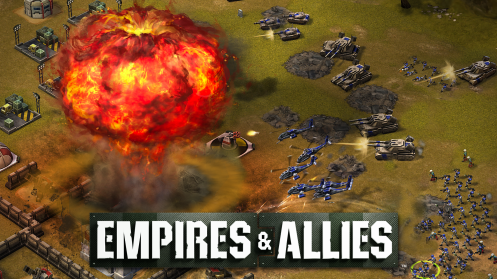
Build your base and set traps for your enemies with spider drones, sentry guns and stealth tanks. Recruit troops, construct helicopters, battle-hardened tanks, warplanes and more to design your perfect army. Deploy your units onto dynamic battlefields where you control how each battle plays out. Use flares to direct your units during battle and amass Command Points to deploy devastating weapons of war. Highly variable combat scenarios in player-versus-player and player-versus-environment modes offer increasing levels of challenge that emulate the unpredictability of warfare.
And what’s perfect army without your comrades? Recruit friends to form alliances and share rewards from your victories. You can also assign friends to defend your base and attack enemies with “Strike Force,” a new feature that makes friends a force multiplier and adds even more meaning to your alliance.
Empires & Allies has built a loyal army of players during its geo-lock beta in nine countries over the last few months, and a huge thank you to all of our commanders that have served in beta. Empires & Allies is available in 13 languages, including English, French, Italian, Spanish, German, Simplified Chinese, Korean, Japanese, Russian, Dutch, Norwegian, Portuguese (Brazilian) and Turkish. The game marks Zynga’s entry in the action category on mobile and a first step in its commitment to the category throughout 2015.
Check out the explosive Empires & Allies trailer for more, and download Empires & Alliestoday on the App Store and Google Play.
Empires and Allies_Key Art
Empires & Allies_Units
Empires & Allies_Nuke
Empires & Allies_Globe

Friday, March 20, 2015

FAQ: Empires & Allies

Commanders, 

We have compiled a list of frequently asked questions about Empires & Allies that we hope you will find helpful.


Q: How do I name my account?

A: Once you connect to Facebook or Game Center, you will be able to name your persona. Until then you will be assigned a general name, such as "General1234556". To connect to Facebook, tap the settings (gear) icon, then tap the button under "Facebook" or "Game Center". 

Q: How do I upgrade my walls?

A: To upgrade the walls on your base, click the base of the individual wall piece you want to upgrade and click the "Upgrade" icon. 

Q: How do I join an alliance?

A: To join or create an Alliance you must first connect to Facebook or Game Center. Tap the icon on the left side of the HUD. Optionally, you may build the "Alliance building", tap it and then tap the Alliance (3-heads) button. From here you can search for your friends Alliance or create your own! 

Q: What happens if I lost connection in an attack?

A: If you lose connection during a match, your troops will continue to follow your last orders offline. To see what happened, tap the Battle Log icon from your HUD and then 'View Replay'.

Q: How do I view my replays?

A: To view your replays, tap the clipboard icon to get to you the 'Battle Log'. You can toggle between Attacks and Defenses. *Note: If you do not see the replay you're looking for, it did not register in our systems, which means you may want to try a different Internet connection.

Q: How do I retaliate an attack?

A: If your base has been attacked, you may open the 'Battle Log' and view the Defense tab data. You will see an option to 'Replay' or 'Retaliate'. Note: Tapping retaliate will not take you right into battle. You will have the chance to scout the enemy and confirm if you want to attack them back. 

Q: What does connecting to Facebook or Gamecenter do?

A: By connecting your game to Facebook or Game Center, your progress will be saved to the server in case you switch devices or need to delete the game. IF YOU DO NOT CONNECT VIA FACEBOOK OR GAME CENTER YOU COULD LOSE YOUR PROGRESS. We will not post to your wall and you will have the option to invite friends to the game. 

Q: What do I do if I get disconnected from the game?

A: Our game requires a steady connection to the Internet via 3G, 4G/LTE or WiFi. If you get disconnected, we recommend closing the app and reopening. If it continues to happen often, first, hard close/restart your device and see if that helps. If the problem persists, you may be in an area where the connection is not strong enough to stay connected. We advise playing from a different location - preferably with strong WiFi signal. 

Q: Can I play the game on multiple devices?

A: Yes, but not simultaneously. After creating an account on one device, you may "switch" to that account on another device. To do this, connect to Facebook or Game Center on the original account. This will store progress. On the second device, from Game Settings, connect to Facebook or Game Center and click the "SWITCH" button. This will display any account associated with your social network. Tap on the one you wish to switch to and then tap "Switch to Selected Account". 

Q: How do I attack my friends?

A: To keep a level and fair game, you will not be able to specifically choose who you want to attack at this time. When clicking "Quick Match", you will be matched up against a player of similar level and medal count. If you think you can dominate the base you see, click Attack. Keep in mind, attacking a base will cost fuel to travel to the next area. If you don't want to attack the base you see in your Satellite Feed, you can spend some fuel and tap "NEXT" to get to the next available map. 

Q: How do I give commands or tell my troops what to do?

A: While attacking a base, you have a few options to send your troops to where specifically you want them to attack. First is your Flare for a cost of Command points. The cost will increase the more you use it. When you reach HQ level 6, you will also be able to assign units to Tarmacs (Alpha, Beta, Charlie). At your base you can assign troops to each tarmac you want to use. During battle, you'll be able to send your tarmac troops to where you want without a cost of Command points. 

Q: What do I do on the world map?

A: A goal of Empires and Allies is to secure the world! This means battling in regions broken down by continent. You will start in Southern Africa where you need to capture and secure each country. You will have the ability to attack preset bases (PvE) and other player Bases (PvP). You have the opportunity to gain 3 stars in each battle. You're welcome to try multiple times to get as many stars as possible. 

Q: How do I report a player in chat?

A: Tap on the line of chat in question and you have the ability to Mute or Report the player. 

Q: How do I submit a help ticket?

A: Before submitting a ticket, it's advised to go to support.zynga.com and search for your issue. Click on Settings>Help>Player Support. Choose from the categories available and supply us with as much information as possible. We aim to respond in less than 24 hours! 

Q: What are the minimum requirements?

A: Empires and Allies requires an Iphone 4 or IPad 2 or higher to play. 

Q: Why isn't EMPIRES & ALLIES available in my app store?

A: If EMPIRES and ALLIES is not showing up in your iTunes App store, check out this blog post for how to stay informed of it's release in your area:http://blog.zynga.com/2014/12/16/the-new-empires-allies/


Thank you! 

Empires & Allies Player Support

How to find your ZID in Empires & Allies

Commander, 

Zynga Player Support might ask you to provide your Social Network ZID so that we can take a look at your account. 

Simply follow these steps to find your ZID in Empires & Allies: 

1. Tap the Settings icon. 


2. Tap the Help tab and you will find your ZID


Thank you! 

Empires & Allies Player Support 

Empires & Allies - Buildings

Commanders, 

Here's some basic information on Buildings in Empires & Allies! 


How to Get 
Let's try building a Supply Stockpile for your Fuel and Supply Resource.  
Tap on the Tool Icon in the lower-left hand corner of your screen to get started. 


You should now be in the Resources Tab to see the Supply Stockpile. 


You can then place the building on a preferred area on your base! 


How to Upgrade 
Now let's try upgrading your HQ! The first step would be to tap on your HQ. Next, tap on the arrow to upgrade the building. 


It will then prompt you if you wish to proceed. You can also choose whether to upgrade normally or if you would like to upgrade instantly which costs gold. 


How to Move / Remove 
Moving is made easy in Empires & Allies! 
You just need to tap on the building you want to move and drag it to a spot on the map where you want to relocate it. 
Once you start moving a building, a grid will show so that you will have an easier time to plan out your base!  


When you start moving your building, you will notice that sometimes the icon will turn Red. That means that there's an obstruction in the area where you want to place your building on. In the screenshot below, there's a tree in the way of the Guard Tower and you may want to move it somewhere else. 


Here's a perfect spot for your Guard Tower! The icon is now Green and you can put your building down. 


Good luck! 

Empires & Allies Player Support 
Related Posts Plugin for WordPress, Blogger...