Showing posts with label Empires And Allies. Show all posts

Thursday, January 8, 2015

FAQ: Empires and Allies


Hi! 

We have compiled a list of frequently asked questions about Empires and Allies that we hope you will find helpful. 
  
Q: How do I name my account?
A: Once you connect to Facebook or Game Center, you will be able to name your persona. Until then you will be assigned a general name, such as "General1234556". To connect to Facebook, tap the settings (gear) icon, then tap the button under "Facebook" or "Game Center".

Q: How do I upgrade my walls?
A: To upgrade the walls on your base, click the base of the individual wall piece you want to upgrade and click the "Upgrade" icon.

Q: How do I join an alliance?
A: To join or create an Alliance you must first connect to Facebook or Game Center. Tap the icon on the left side of the HUD. Optionally, you may build the "Alliance building", tap it and then tap the Alliance (3-heads) button. From here you can search for your friends Alliance or create your own!

Q: What happens if I lost connection in an attack?
A: If you lose connection during a match, your troops will continue to follow your last orders offline. To see what happened, tap the Battle Log icon from your HUD and then 'View Replay'.

Q: How do I view my replays?
A: To view your replays, tap the clipboard icon to get to you the 'Battle Log'. You can toggle between Attacks and Defenses. *Note: If you do not see the replay you're looking for, it did not register in our systems, which means you may want to try a different Internet connection.

Q: How do I retaliate an attack?
A: If your base has been attacked, you may open the 'Battle Log' and view the Defense tab data. You will see an option to 'Replay' or 'Retaliate'. Note: Tapping retaliate will not take you right into battle. You will have the chance to scout the enemy and confirm if you want to attack them back.

Q: What does connecting to Facebook or Gamecenter do?
A: By connecting your game to Facebook or Game Center, your progress will be saved to the server in case you switch devices or need to delete the game. IF YOU DO NOT CONNECT VIA FACEBOOK OR GAME CENTER YOU COULD LOSE YOUR PROGRESS. We will not post to your wall and you will have the option to invite friends to the game. 

Q: What do I do if I get disconnected from the game?
A: Our game requires a steady connection to the Internet via 3G, 4G/LTE or WiFi. If you get disconnected, we recommend closing the app and reopening. If it continues to happen often, first, hard close/restart your device and see if that helps. If the problem persists, you may be in an area where the connection is not strong enough to stay connected. We advise playing from a different location - preferably with strong WiFi signal.

Q: Can I play the game on multiple devices?
A: Yes, but not simultaneously. After creating an account on one device, you may "switch" to that account on another device. To do this, connect to Facebook or Game Center on the original account. This will store progress. On the second device, from Game Settings, connect to Facebook or Game Center and click the "SWITCH" button. This will display any account associated with your social network. Tap on the one you wish to switch to and then tap "Switch to Selected Account".

Q: How do I attack my friends?
A: To keep a level and fair game, you will not be able to specifically choose who you want to attack at this time. When clicking "Quick Match", you will be matched up against a player of similar level and medal count. If you think you can dominate the base you see, click Attack. Keep in mind, attacking a base will cost fuel to travel to the next area. If you don't want to attack the base you see in your Satellite Feed, you can spend some fuel and tap "NEXT" to get to the next available map.

Q: How do I give commands or tell my troops what to do?
A: While attacking a base, you have a few options to send your troops to where specifically you want them to attack. First is your Flare for a cost of Command points. The cost will increase the more you use it. When you reach HQ level 6, you will also be able to assign units to Tarmacs (Alpha, Beta, Charlie). At your base you can assign troops to each tarmac you want to use. During battle, you'll be able to send your tarmac troops to where you want without a cost of Command points. 

Q: What do I do on the world map?
A: A goal of Empires and Allies is to secure the world! This means battling in regions broken down by continent. You will start in Southern Africa where you need to capture and secure each country. You will have the ability to attack preset bases (PvE) and other player Bases (PvP). You have the opportunity to gain 3 stars in each battle. You're welcome to try multiple times to get as many stars as possible.

Q: How do I report a player in chat?
A: Tap on the line of chat in question and you have the ability to Mute or Report the player. 

Q: How do I submit a help ticket?
A: Before submitting a ticket, it's advised to go to support.zynga.com and search for your issue. Click on Settings>Help>Player Support. Choose from the categories available and supply us with as much information as possible. We aim to respond in less than 24 hours! 

Q: What are the minimum requirements?
A: Empires and Allies requires an Iphone 4 or IPad 2 or higher to play. 

Q: Why isn’t EMPIRES & ALLIES available in my app store?
A: If EMPIRES and ALLIES is not showing up in your iTunes App store, check out this blog post for how to stay informed of it’s release in your area:http://blog.zynga.com/2014/12/16/the-new-empires-allies/


Thank you!

Your Empires and Allies Team

Tuesday, December 16, 2014

Zynga enters into mobile Action Strategy category with the new Empires & Allies

Empires & Allies
Target Locked! Today Zynga is excited and proud to announce its entry into the mobile Action Strategy category with an early beta of a new mobile game: “Empires & Allies”.
Action Strategy is one of the most popular categories on mobile. The beta of new “Empires & Allies” marks the first step for Zynga and its commitment to this category throughout 2015. The experienced team, led by veteran RTS developers, is excited at the huge opportunity to innovate and redefine what players expect from a mobile strategy game.
The new “Empires & Allies” completely reimagines the brand for today’s mobile audience based on player feedback and insights the team has learned over the years. Players want to immerse themselves in a realistic modern military strategy game on mobile – one that puts them in control of their army with more choice and strategy on how best to use the weapons of modern war – and this is the foundation of the new “Empires & Allies”.
“Empires & Allies” is now in its initial geo-lock beta release and is set to launch worldwide in early 2015. During the first few weeks and months of geo-lock beta, the team will listen to and improve the game based on live player feedback while also actively adding new features and gameplay.
We’ll have more news coming soon on the new “Empires & Allies” in the coming months. Stay tuned for the latest updates for “Empires & Allies” by liking us on Facebook, and be sure to text* “TANK” to 99642 (inside U.S.) or to 1-650-763-2417 (outside U.S.) to receive a link and be one of the first to play at worldwide launch.
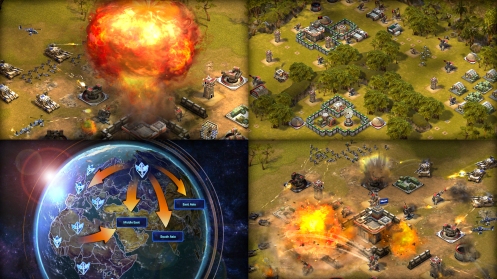
Empires & Allies Game Screenshots
*By texting TANK you agree to receive an automated text from Zynga to your mobile number. Msg & data rates apply. Consent not required for purchase.

Monday, June 17, 2013

Empires and Allies is no longer available


Greetings, 

Thank you for your interest in Empires and Allies and for being a loyal player. Unfortunately, Empires and Allies is no longer available. 

The fun hasn’t ended just yet! We invite you to check out other Zynga games like Bubble Safari, Chefville, FarmVille 2 or Mafia Wars.

Thank you for your time in Empires and Allies. We look forward to seeing you again in other Zynga games.


Sincerely,

The Empires and Allies Team

Friday, May 17, 2013

Important annoucement!


Greetings soldiers,

Thank you for supporting Empires and Allies and for being a loyal player!

We're sorry to inform you that Empires and Allies on Facebook will be shutting down on June 17th, 2013. You can continue to play the game until then. We appreciate your participation in Empires and Allies as it helped make the game a fun place to meet and play with your friends.

In place of Empires and Allies we encourage you to play other Zynga games like Bubble Safari, Chefville, FarmVille 2 and Mafia Wars. Zynga is committed to helping Empires and Allies players find a new place to play. Log into the game here: https://apps.facebook.com/empiresandallies/for more information about a bonus package in another game.

Thank you for your time in Empires and Allies. We look forward to seeing you again in other Zynga games.


Sincerely,

The Empires and Allies Team

Friday, April 26, 2013

How to: Submit a Screenshot Video to Customer Support

When submitting attachments to the Customer Support team for review, a screenvideo attachment is the best method to illustrate that a problem is occurring in CoasterVille. Screen video attachments clearly outline problems and provide actionable steps to correct when a complicated problem arises.

Please follow the instructions listed below for an outline on how to submit a screen video to Zynga Customer Support.

NOTE: The suggested screen video software is only one of many free image hosting websites. It is not required that players use Jing to submit attachments to Zynga Customer Support. Additionally, a vast majority of free image hosting websites have a bandwidth limit. This means that if enough people view your picture, there is the possibility that your bandwidth will be exceeded, and your image will no longer be visible.


How to take a screen-video (Using Jing):
  1. Download and install a free screen video software (Jing is commonly used: http://www.techsmith.com/jing/ ).
  2. Locate the little yellow sun along the border of your primary monitor.
  3. Use the capture feature to designate the area of your screen you want to capture. 
  4. Select 'Capture Video/Film Icon' option to begin a screenvideo and start recording.
  5. Click the stop button to stop recording when you have captured the desired video. A new window with the screen video will be shown.
  6. Share the screenvideo via screencast.com. Attach your UID to the end of the file name for customer support review.
  7. Check the history section (under the little yellow sun) to retrieve the url link for the recorded screenvideo.
  8. Locate the saved screenvideo and select 'Share' this will generate a new window with the url located in the address bar .
  9. Submit the saved url to your support incident for verification purposes.

Wednesday, February 27, 2013

Alliances! FAQ

Ten-HUT!

Soldiers- we're ready to introduce you the coolest feature yet....... ALLIANCES!

User-added image


For the first time ever, we're giving you the chance to team up with your
friends and help each other in battles! 


Here's a guide, on how the feature will work:


This great new feature allows you to:

- Form Alliances with your friends, to fight global opponents and win medals and
  powerful units.
- This feature allows neighbors to team up into Alliances of up to 10 players.
- Alliances will be able to fight other teams through the World Domination Mode.

Where can i find this feature?

You can get started on forming your new Alliance, by clicking on the icon
that appears to the left of your neighbor bar.

User-added image


How do you go about this?

Alliances will let you team up with your friends and help them in battle. You can begin your journey by becoming an Alliance leader! 

Should you choose not to, you can opt to join your neighbor’s Alliance instead. You can join your friends’ Alliances for free. 

How do I become a leader?

To lead an Alliance of your own, you have to prove you have what it takes! Show everyone that you possess the three key aspects of what it takes to be a powerful leader :

  • Wealth: Leading an Alliance is an expensive affair. You must prove you can support one.
  •  
  • Power: Only the most powerful can be Alliance leaders. Don’t be afraid to get brutal in the field.
  •  
  • Connections:Who you know matters. Prove you have the right connections to make your Alliance the strongest.


User-added image


You need to complete all three of these individual quests to create an Alliance.

What can a leader do?

The leader gets privileges that regular members do not receive.
The leader decides:

  • The name of the Alliance
  • The crest (symbol ) that represents your alliance in battle
  • Choice to remove members out of the Alliance


Crests:

Crests are shields that represent your Alliance, so that your neighbors and you can identity them anywhere. The leader of the Alliance may choose his Alliance crest from the following options:

User-added image


Note: you can choose to change your crest at any point by clicking the edit button found in your Alliance profile pop up. 

What's next?
Once you have formed an Alliance or joined one, you may start inviting your neighbors and friends to join your Alliance. If you have enough neighbors, you can go to the World Parliament and find more players to join you.


Rules of Battle:

Once you have formed your Alliance, you will have access to exclusive new Alliance battles! Here, you can challenge and take on other Alliances, to prove to who is best. 

Defense:The combined strength of every alliance members defense force, will become your Alliance's defense force i.e. if somebody were to attack your Alliance they would have to face off against all your allies.

Attack: When you attack an alliance, you will have to defeat all of members of the opposing Alliance. After you defeat each member, you will win a dominance point bonus and damage the opposing Alliances health. If you manage to defeat the whole Alliance (every member), you will win a big domination point reward!!

Health: Every time you are defeated in battle, you lose health. So keep an eye out for your weak spot. If your Alliance has more health than anyone else in World domination, before world domination mode refreshes (look out for the timer in the game), your entire Alliance will win a crown and a HUGE domination point prize!
**With all of these domination points that you accumulate, you will be able to unlock powerful new units, faster than ever before (and permanently)**

Allies: your Allies will be able to give your power ups during an Alliance battle, so that you will be fighting alone. You can ask for power ups by selecting who you would like help from. 

Rivals: any Alliances that have attacked you will appear on your 'rivals list' on world domination mode. This will allow you to battle other Alliances one on one!


How to get ‘Crown’ in alliances? How to get alliance health? How to Abandon/ Leave an Alliance? 


How to get ‘Crown’ in alliances

1. To get a Crown, your alliance must have the highest health out of all the alliances seen in the list in World Domination -> Alliances tab when the timer expires.
Case 1:


In the above images My alliance ‘Ninja Alliance’ has thousand health points which is greater than the alliance second in the list ‘Geoff Alliance’.
I will only receive the ‘Crown’ if my alliance can maintain a higher health out of all the alliance in the list when the timer showing ‘1:11:16:33’ expires.
When the timer expires the List refreshes


And I get the pop-up saying my alliance has won a ‘Crown’


2. Your alliance is always shown first in the list, but in order to get a ‘Crown’ your alliance health must be higher than the health of the alliance 2nd in the list( The list is always sorted in Decreasing health, Except for your alliance)


Case 2:


In the above screenshot my alliance ‘Ninja Alliance’ has a lower health that the 2nd alliance ‘Geoff Alliance’ therefore if my alliance still has a lower health than the other alliance in the list when the timer expires then I won’t receive  a ‘Crown’.

How to get alliance health

 1. Win alliance battles
10 Health points are added if you win 1 wave in alliance battle. ( Defeating a 5 member alliance = 10 X 5 ie, 50 health points will be added to your overall alliance strength)

2. Winning a ‘Crown’ adds a certain percentage of health to your alliances total health (the percentage of health varies from alliance to alliance) 


2. You can always restore complete health by purchasing Health points using ‘Empire Points’ from the Alliances UI and from Alliances tab in World Domination window. The buy button is placed adjacent to the health bar


How to Abandon/ Leave an Alliance
An alliance member or leader can leave an Alliance by clicking on the abandon button in Alliance UI.


Feedback
Please leave your CONSTRUCTIVE feedback in this thread:

Alliances!


Note that this is for feedback, NOT bug reports—bug reports should go in our new Bug Reporting Forum!


Get to it, soldiers! DISMISSED!

Saturday, February 9, 2013

Zynga's Support Options And How To Get Access to Premium Support in Empires and Allies


Game cash spent within 30 days Community Forums Player-to-Player Social Support Email - 48hours SLA* Email - Premium 8 hour SLA* Premium Chat Support**  
FREE X X Go now
$ 0.00 - $19.99 X X
$ 20.00 - $49.99 X ✓ 30 Days
$ 50.00 or more X ✓ 60 Days

* English, French, German, Italian, Spanish and Portuguese Only
** Must maintain good standing with customer support – see article for terms and conditions
^Current Premium Support games include Bubble Safari, Cafe World, CastleVille, ChefVille, CityVille, CityVille 2,Empires and Allies, FarmVille, FarmVille 2,Pioneer Trail, Hidden Chronicles, Mafia Wars, Ruby Blast, YoVille, Zynga Poker, Zynga Bingo, and Zynga Slingo

If you are interested in becoming a premium player with access to “Premium Support” which includes chat support and improved email service levels, you can start by making a purchase of “in game currency” above the minimum premium support threshold. See link below to get started. For more information and Frequently Asked Questions regarding live support, click here.

If you would like to know how to make a purchase of in-game currency, please click here.

Premium Support Terms & Conditions: Zynga reserves the right to make changes to the premium support program, including adjusting required purchase amounts and related access periods. If we make what we consider to be material changes to the program or these terms and conditions, we will notify you by email or by placing a notice on our customer support site. The Premium Support Program is offered in English Only. Mobile Purchases do not count toward meeting Premium Support thresholds.

Purchases may take up to 24 hours to process before Premium Support is available.  Premium Support users must maintain good standing with Zynga Customer Support. Remember, use it, don’t abuse it! For additional information regarding Zynga’s Support Policy and how not to abuse the system, please click here.

We'd love to hear any feedback you have about our support offerings. To submit your feedback, please click here.

Wednesday, December 19, 2012

Get a Bundle - Limited Time Offer (Empires & Allies)

EMPIRES & ALLIES - Get a Bundle!

A Limited Time Offer!

Supply the troops! Get a Bundle, get stronger! It's the only way to get the
Prototype Unit, which can't be built in your hangar, only purchased - for
a limited time!

Tuesday, December 18, 2012

Transformer Tumult

Ten-HUT!

Soldiers – Sierra has heard rumors of a special technology that can transform units from air, to land to sea. Help her locate it so you can use it to enhance your forces. Remember, where there’s war technology to be found, the villains won’t be far behind.


Here’s what’s in store for you:
Sierra has heard rumors from her bot sources of a technology that can transform units. If found, this technology will be a great asset for your military. You will have to travel to a deserted island with Sierra, to help her retrieve the tech. It won’t be as smooth as you think. There’s another villain's forces trying to beat you to the prize. Don’t let them get away with it. Fight!

Here’s what you must do:

1. The whole quest unfolds in three stages. Each stage has three events and each event has three tasks. 
2. Begin the quest by clicking on the entry pop-up or the new quest icon on your home screen.
3. Then, follow the instructions to progress through the quest. Win a cool alien-tech unit on completion.

Rewards:

  • Completing tasks in each event will earn you rewards.
  • On completing all the tasks across all the events, you will win 1 Transformer Fighter, 1 Transformer Tank and 3 Transformer Gunboats!


Hurry Soldiers! The race for this new technology has just begun.


Feedback:

Please leave your CONSTRUCTIVE feedback in this thread:

Transformer Tumult

Note that this is for feedback, NOT bug reports—bug reports should go in our new Bug Reporting Forum!

Get to it, soldiers! DISMISSED!

Thursday, December 13, 2012

Saving Sarah

Ten-HUT!

Soldiers – Sarah is missing! The last we know, she was on a diplomatic visit to the nation of Brushwen! Something is wrong. We must track her down.

Here’s the story:
Sarah was visiting a neighboring Empire, Brushwen, for diplomatic talks. You haven’t heard from her in days – that’s not like her at all. You suspect that something is wrong. Brushwen is a nation that has never caused any trouble before, so you’re almost certain that someone else is behind Sarah’s disappearance. You visit Brushwen and get to the bottom of this mystery - fighting all those who stand in your way and finally defeating the mastermind criminal responsible.

Your Mission:
You can follow either one of two paths or both paths simultaneously, to reach the end of the mission and rescue Sarah. You will have to visit Brushwen, investigate and find out who is behind the dastardly plot to kidnap Sarah! You will have to then make your way to the kidnapper’s lair and bring Sarah out unharmed. Ensure a few casualties in the kidnapper’s forces!

Rewards:
Players at levels 12 - 30 can win version I of the SpecOps Hyena and SpecOps Shan T-20 Copter.


Players at levels 31 - 50 can win Version II.


Players at levels 51+ can win Version III.


What are you waiting for Soldier? One of your people is in grave danger. Act now!

Feedback:

Please leave your CONSTRUCTIVE feedback in this thread:

Saving Sarah

Note that this is for feedback, NOT bug reports—bug reports should go in our new Bug Reporting Forum!

Get to it, soldiers! DISMISSED!

Saturday, December 8, 2012

How to get Alliance Crowns and Increase Alliance Health

Ten-HUT!

Soldiers – There have been questions and doubts regarding how you can earn Alliance Crowns, to complete quests. What follows is a detailed description of how you can earn these Crowns when you fight Alliance Battles. Read on.

To get a Crown, your Alliance must have the highest health out of all the Alliances seen in the list in World Domination mode in the Alliances tab and the Alliances in the the Rivals tab (if there are any), when the timer expires.

Let's assume for the sake of this example, that your Alliance is called the Ninja Alliance.

In the image below - the ‘Ninja Alliance’ has 1000 health points which is greater than the Alliance that shows up second in the list the ‘Geoff Alliance’. The Ninja Alliance will only receive the ‘Crown’ if it can maintain a higher health out of all the Alliances on the list (in both the Alliances Tab and Rivals Tab) when the timer (showing ‘1:11:16:33’ in the picture) expires.


When the timer expires the List refreshes, as shown below:


If you have the highest health among the Alliance on the list, you get a pop-up like the one below:


Remember that your Alliance is always shown first in the list, but in order to get a ‘Crown’ your Alliance health must be higher than the health of the Alliance that appears second in the list (The list is always sorted according to Decreasing health, except for your Alliance which stays on top all the time despite the health). This is sho

In the screenshot below, the ‘Ninja Alliance’ has a lower health that the second Alliance, the ‘Geoff Alliance’. If the Ninja Alliance still has a lower health than the second Alliance in the list, when the timer expires then you won’t receive a ‘Crown’.


If you're wondering how you can increase your Alliance Health, read on:

Method 1:
Fight Alliance Battles
 - 10 Health points are added if you win 1 wave in Alliance battle. (Defeating a 5-member Alliance = 10 X 5 i.e., 50 health points will be added to your overall Alliance strength). See the image below:


Method 2:
Win Alliance Crowns
 - Winning a ‘Crown’ adds a certain percentage of health to your Alliance's total health (the percentage of health varies from Alliance to Alliance). See image below:


Method 3:
Pay to restore complete Alliance health
 - You can always restore complete health by purchasing Health points using ‘Empire Points’ from the Alliances UI and from Alliances tab in World Domination window. The buy button is placed adjacent to the health bar. See images below:


Catch a Falling Satellite

Ten-HUT!

Soldiers – An unidentified satellite has crashed in your Empire! You must investigate and find out where it came from. It could well belong to your enemies!

Here’s the story:
When an unidentified satellite crashes in your Empire, you discover that your enemies have been spying on you from the skies. What’s worse, there’s another satellite out there preparing to do some serious damage via a laser beam. You must investigate, find out who is behind this and put an end to it.

Your Mission:
You can follow either of two paths to the end of this quest! You can also go down both paths at the same time. Both paths involve finding out who is behind the satellite and then putting a stop to it. Dr. Seabolt has some tricks up his sleeve and will help you along the way!

Rewards:
Players at levels 12 - 30 can win version I of the SpecOps Razor Fighter and White Kruger Infantry


Players at levels 31 - 50 can win version II


Players at levels 51+ can win version III


What are you waiting for Soldier? Your Empire is under threat. Act now!

Feedback:

Please leave your CONSTRUCTIVE feedback in this thread:

Catch a Falling Satellite

Note that this is for feedback, NOT bug reports—bug reports should go in our new Bug Reporting Forum!

Get to it, soldiers! DISMISSED!
Related Posts Plugin for WordPress, Blogger...